
BIM with Logikal
Bring planning data in safely. Work up elements professionally. Return clean, structured results.
For many window, door and façade manufacturers, BIM is already part of everyday project work. The key question for fabricators is: how can BIM requirements be built safely into existing processes and delivered efficiently?
Logikal gives you a reliable way forward. The software supports professional BIM project delivery: you take over the relevant planning data, design and cost your elements in Logikal, then return the finished component data to the model in a structured format.
Process your BIM projects efficiently and securely, with structured data, clear handovers and a workflow that fits your business.

BIM - clear and practical
In BIM projects, information often comes from the building model. For window, door and façade manufacturers, however, the real work starts after that: checking dimensions, working up elements, taking technical requirements into account, costing, documenting and preparing the data for the next steps.
If these steps are handled manually or across separate systems, duplicate entry, follow-up questions and unnecessary corrections can quickly arise.
Logikal helps you turn BIM data into a practical working process - from planning through to further project processing.
Your benefits at a glance
- Bring data from the BIM project into Logikal in a structured way
- Process opening dimensions and element information further
- Design and cost elements in Logikal
- Add technical information such as U-values, colours or sections
- Create digital twins of your elements
- Return component data as a 3D model
- Use proven Logikal workflows in BIM projects too
From model data to a workable basis for each element
BIM projects place high demands on data quality and coordination. For your business, what matters most is that the information supplied is not only available, but also technically usable.
With Logikal, you can bring data from the Revit building model into your familiar Logikal environment and continue working on it there. The planning data is then used in design and costing to create the required elements.
That means BIM does not stop at model handover. The data becomes part of your real production workflow.
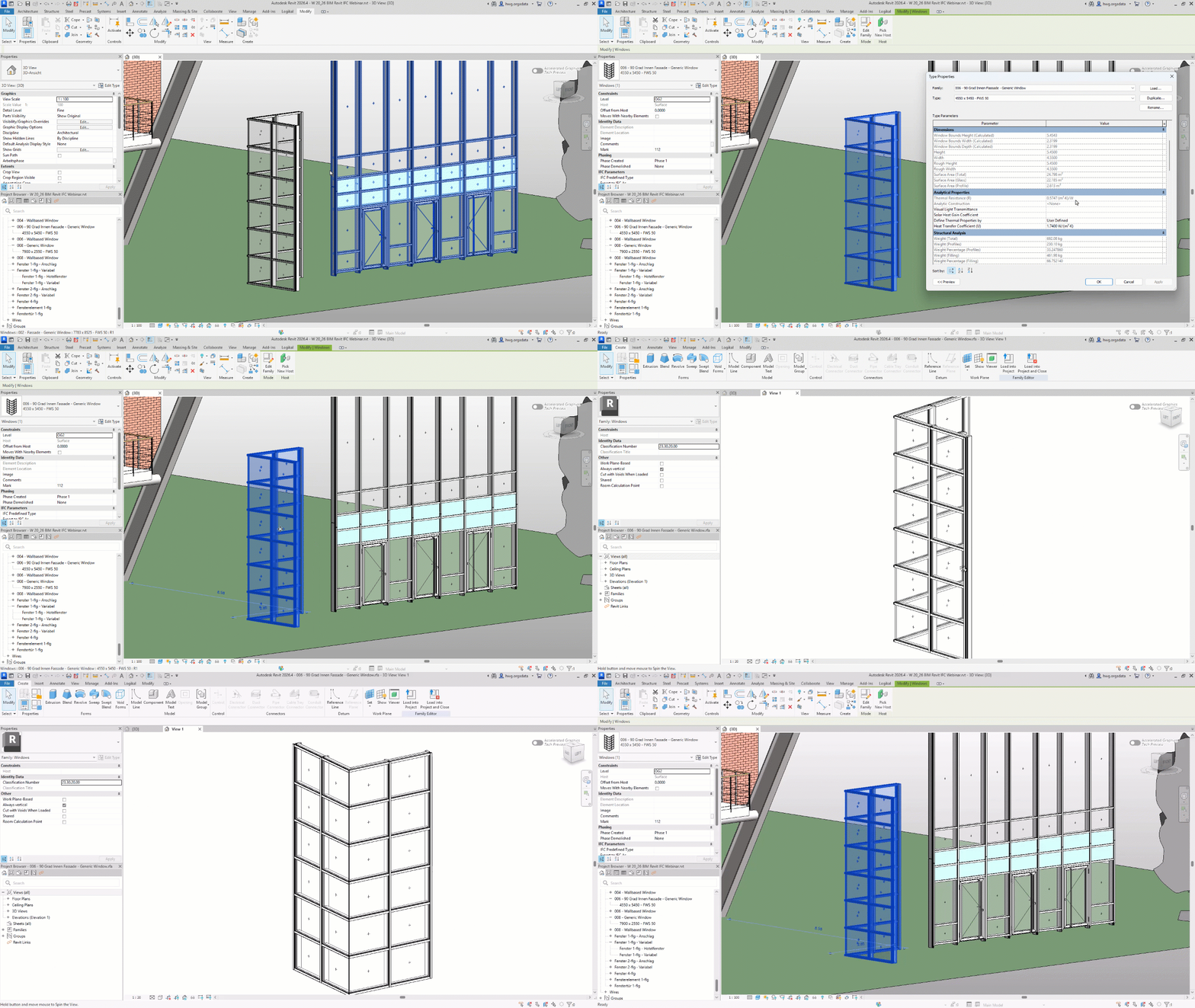
What Logikal supports in the BIM process

Import data
You take relevant information from the building model and use it in Logikal, such as opening dimensions and quantities. This creates a structured basis for further processing.

Process elements
The imported positions are designed and costed in Logikal. You continue to work with up-to-date system data, technical checks and the familiar Logikal functions.

Create a digital twin
You create digital twins from the processed elements. These contain not only geometry, but also important technical information.

Return data
The completed 3D models are passed back to the BIM project with the relevant information — for example colour, U-value or section details.
BIM without unnecessary system breaks
BIM is designed to make collaboration easier. In practice, however, it only creates value when data does not have to be built up, checked or maintained more than once.
Logikal connects BIM requirements with the processes window, door and façade manufacturers already need: design, costing, technical checks, documentation and handover to downstream workflows.
That helps in day-to-day work
- fewer manual transfers between the model and design
- less risk from duplicate data entry
- traceable processing of elements
- a better basis for coordination with planners and architects
- consistent data for further process steps
- a familiar working environment instead of additional complexity
Our BIM webinar shows you in practical terms how easily BIM processes can be implemented with Logikal.

Make collaboration with planners and architects easier
In BIM projects, different parties work with shared building data. For window, door and façade manufacturers, it is important that handovers are clearly defined and information is passed on correctly.
Logikal supports structured data exchange between the design office and your business. You can use the supplied model data for your technical processing and return the completed component data to the project.
This makes collaboration more dependable: planners receive usable information back, while your business continues working from a checked basis.
Integrate BIM into your Logikal workflow
With Logikal, BIM does not remain an isolated work step. The data taken from the BIM model can be used for design, costing, work preparation and, where required, fabrication.
You are not working with a detached BIM tool. Instead, you integrate BIM into your existing processes with Logikal.
Explore further solutions with Logikal here.
Who benefits from BIM with Logikal?
Logikal simplifies and speeds up BIM processes for businesses that design, cost or fabricate windows, doors and façades and need to work professionally with digital building data. Planning and architectural offices also benefit from straightforward data exchange.
The solution is especially relevant for:
- window manufacturers
- door manufacturers
- façade manufacturers
- metal fabricators
- aluminium, steel and PVC-U fabricators
- businesses that need to meet BIM requirements from projects or tenders
- companies that want to exchange data with planners and architects in a structured way

Deliver BIM projects professionally
With Logikal, you bring BIM data into a working process that fits your business. You take relevant information from the building model, process your elements professionally in Logikal and return the completed component data in a structured format.
This creates a more connected process: fewer duplicate entries, clearer handovers and a stronger basis for professional BIM projects in window, door and façade fabrication.